YARA & Sigma rules
Table of Contents
Detection engineering has become an area of cybersecurity that I’ve been increasingly interested in, particularly the process of turning knowledge about attacker techniques and malicious activity into practical, repeatable detections.
Recently I completed Hack The Box Academy’s YARA & Sigma for SOC Analysts module, which is part of the SOC Analyst job-role path. The module provided a hands-on introduction to two widely used detection rule formats: YARA and Sigma.
Specifically, the module covers:
- how to create YARA rules both manually and automatically and apply them to hunt threats on disk, live Windows processes, memory images, and online malware databases
- how to build Sigma rules, translate them into SIEM search queries using the “sigmac” utility, and hunt threats in both event logs and SIEM solutions
In this post, I’ll go through the concepts I learned while working through the module, explain how YARA and Sigma rules are structured, and demonstrate how they can be used to detect suspicious activity.
YARA and Sigma are open, standard rule formats, widely adopted by the cybersecurity community, for detecting threats: YARA identifies malicious files (or binaries), Sigma detects malicious behaviors.
Together, they provide two complementary approaches to detection: Sigma for behavioral detection (malicious activity in telemetry) on event streams, YARA for content-based detection.
Introduction to YARA & Sigma
YARA and Sigma rules grant SOC analysts the capabilities to detect and respond to security threats. YARA excels in file and memory analysis, as well as pattern matching, whereas Sigma is particularly adept at log analysis and SIEM systems.
YARA and Sigma rules are invaluable for SOC analysts as they allow to develop customized detection rules tailored to their unique environment and security needs. For example, custom YARA rules can help identify unique or targeted threats that are specific to our organization’s assets, applications, or industry.
YARA rules are particularly useful for SOC analysts in detecting and classifying malware. Leveraging YARA rules, analysts can create specific patterns or signatures that correspond to known malware traits or behaviors.
Utilizing Sigma rules, analysts can filter and correlate log data from disparate sources, concentrating on events pertinent to security monitoring. An open-source tool called Chainsaw can be used to apply Sigma rules to event log files.
Both YARA and Sigma adhere to standard formats and rule structures, that facilitate the creation and sharing of detection rules within the cybersecurity community. This fosters collaboration among SOC analysts and encourages knowledge sharing.
For instance, “The DFIR Report” shares YARA and Sigma rules derived from their investigations.
YARA
YARA (Yet Another Recursive Acronym) is a powerful pattern-matching tool and rule format used for identifying and classifying files based on specific patterns, characteristics, or content. SOC analysts commonly use YARA rules to detect and classify malware samples, analyse and classify suspicious files, or detect Indicators of Compromise (IOCs).
YARA rules are typically written in a rule syntax that defines the conditions and patterns to be matched within files. These rules can include various elements, such as strings, regular expressions, and Boolean logic operators, allowing analys to create complex and precise detection rules. It’s important to note that YARA rules can recognize both textual and binary patterns, and they can be applied to memory forensics activities as well (YARA can identify suspicious or malicious patterns in captured memory images).
When applied, YARA scans files or directories and matches them against the defined rules. If a file matches a specific pattern or condition, it can trigger an alert or warrant further examination as a potential security threat.
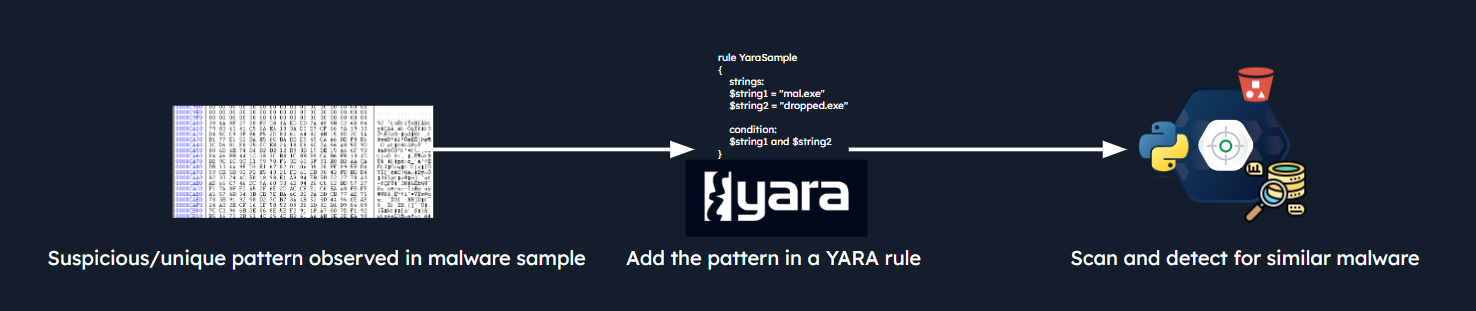 Source: Hack The Box - YARA & Sigma for SOC Analysts module
How does YARA work?
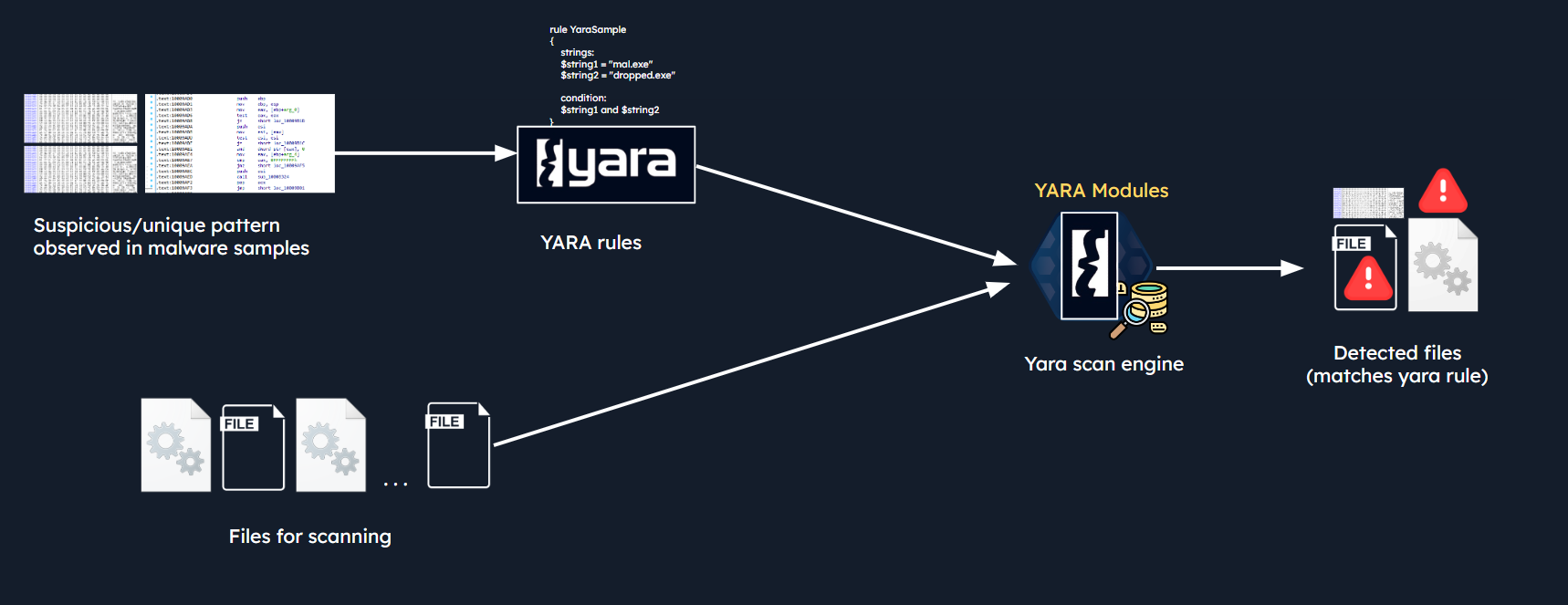
The YARA scan engine, equipped with YARA modules, scans a set of files by comparing their content against the patterns defined in a set of rules. When a file matches the patterns and conditions specified in a YARA rule, it is considered a detected file. This process allows analysts to efficiently identify files that exhibit specific behaviors or characteristics.
This flow is demonstrated in the diagram below:
 Source: Hack The Box - YARA & Sigma for SOC Analysts module
Note
YARA modules are add-on components that extend YARA’s pattern-matching capabilities by parsing complex file formats and exposing specific data structures or functions for use in detection rules. Instead of limiting a rule to searching for raw text or byte sequences, modules allow security analysts to write advanced logical conditions based on deep file properties and metadata.
For example, the PE module allows you to create more fine-grained rules for PE (Portable Executable) files by using a set of specialized functions and structures that can inspect and analyze the details of
PEfiles, making the rule more precise when it comes to detecting characteristics in Windows executables; the ELF module exposes most of the fields present in an ELF (Executable and Linkable Format) header; the Math module provides mathematical functions like entropy calculations.
In the above diagram, we can see that the YARA scan engine, using YARA modules, matches patterns defined in a set of rules against a set of files, resulting in the detection of files that meet the specified patterns and conditions.
In more detail:
Set of Rules: YARA rules define specific patterns, characteristics, or indicators that need to be matched within files. So, rules contain suspicious patterns and can include: strings, regular expressions, byte sequences, and other indicators of interest. The rules are typically stored in a YARA rule file format (e.g.,.yaraor.yarfile)Set of Files: A set of files, such as executables, documents, or other binary or text-based files, are provided as input to the YARA scan engine. The files can be stored on a local disk, within a directory, or even within memory images or network traffic captures.YARA Scan Engine: The YARA scan engine is the core component responsible for performing the actual scanning and matching of files against the defined YARA rules. The YARA scan engine iterates through each file in the set, one at a time. For each file, it analyzes the content byte by byte, looking for matches against the patterns defined in the YARA rules.
When a file matches the patterns and conditions specified in a YARA rule, it is considered a detected file. The YARA scan engine records information about the match, such as the matched rule, the file path, and the offset within the file where the match occurred and provides output indicating the detection.
YARA rule structure
YARA rules consist of several components that define the conditions and patterns to be matched within files. Let’s consider the following YARA rule that identifies strings associated with the WannaCry ransomware:
rule Ransomware_WannaCry {

    meta:
        author = "Madhukar Raina"
        version = "1.0"
        description = "Simple rule to detect strings from WannaCry ransomware"
        reference = "https://www.virustotal.com/gui/file/ed01ebfbc9eb5bbea545af4d01bf5f1071661840480439c6e5babe8e080e41aa/behavior"

    strings:
        $wannacry_payload_str1 = "tasksche.exe" fullword ascii
        $wannacry_payload_str2 = "www.iuqerfsodp9ifjaposdfjhgosurijfaewrwergwea.com" ascii
        $wannacry_payload_str3 = "mssecsvc.exe" fullword ascii

    condition:
        all of them
}
Each rule in YARA starts with the keyword rule followed by a rule identifier (in this case “Ransomware_WannaCry”). The rule above instructs YARA to flag any file, containing all three specified strings, as Ransomware_WannaCry.
That’s a basic structure of a YARA rule. It starts with a header containing metadata, followed by
a body that specifies the patterns or indicators to be matched within the files, and conditions that define the context or characteristics of the files to be matched. Conditions can be based on file properties, strings, or other indicators. The use of metadata and tags helps in organizing and documenting the rules effectively.
In the YARA rule above, the condition section simply states all of them, which means that all the strings defined in the rule must be present for the rule to trigger a match.
Let’s consider the following different condisiton:
condition:
        filesize < 100KB and (uint16(0) == 0x5A4D or uint16(0) == 0x4D5A)
This other condition specifies that the file size of the analyzed file must be less than 100 kilobytes (KB) and it also specifies that the first 2 bytes of the file must be either 0x5A4D (ASCII MZ) or 0x4D5A (ASCII ZM), by using uint16(0), where 0 is the offset.
Specifically:
uint16–> indicates the data type to be extracted, which is a16-bit unsigned integer (2bytes).(0)–> the value inside the parentheses represents the offset from where the extraction should start. In this case,0means the function will extract the 16-bit value starting from the beginning of the data being scanned.
Note
The 2-byte sequence
4D 5A(ASCII string “MZ”) is known as “Magic Number”: it represents the 2-byte identifier (digital signature) at the start of.exefiles. In Little-Endian architectures (x86/x64 processors), bytes in memory are inverted, so the constant0x5A4Dis read in the order4D5A(“MZ”).
So, this condition checks if the first two bytes of the file are “MZ”, indicating a Windows PE file.
YARA rules can be customized to suit our specific use cases and detection needs. The YARA official documentation can be found at the following link. Another resource on effective YARA rule developement comes from Kaspersky.
yarGen
yarGen (created by security researcher Florian Roth) is our go-to tool when we need an automatic YARA rule generator. What makes it a gem is its ability to churn out YARA rules based on strings found in malicious files while sidestepping strings common in benign software. This is possible because yarGen comes equipped with a vast database of goodware strings and opcodes.
yarGen is a great tool to develop some good yara rules by extracting unique patterns. Once the rule is developed with the help of yarGen, we definitely need to review and add/remove some more patterns to make it an effective rule. As Florian Roth mentioned in his blogpost, the main purpose of yarGen is to develop the best possible rules for manual post-processing.
Hunting for evil within online datasets with YARA
Unpac.Me is a tool tailored for malware unpacking. The great thing about Unpac.Me is that it grants us the capability to run our YARA rules over their database of malware submissions. Considering the hurdles of gaining access to commercialized malware datasets, Unpac.Me is a great resource to test out our YARA rules.
Source: https://support.unpac.me/howto/hunting-with-yara/
- Register for zero-cost access and hop into the platform.
- Head over to
Yara Huntand chooseNew Hunt. - Enter the YARA rule into the designated rule space.
- First hit
Validateand thenScan. - Scan results get displayed right in front of our eyes. The system scans through all malware submissions, spotting any match.
For individuals and organizations with limited resources, Unpac.Me and similar platforms can serve as stepping stones to enhance their malware analysis and detection capabilities
Sigma
Sigma is a generic signature format used for describing detection rules for log analysis and SIEM systems. It allows SOC analysts to create and share rules that help identify specific patterns or behaviors indicative of security threats or malicious activities. Sigma rules are typically written in YAML format and can be used with various security tools and platforms, including SIEM and EDRs.
The main advantage of Sigma rules is their portability and compatibility with multiple SIEM and log analysis systems, enabling analysts to write rules once and use them across different platforms.
Sigma can be considered as standardized format for analysts to create and share detection rules. Sigma rules can be used to detect suspicious activities in various log sources. This also helps in building efficient processes for Detection as Code by automating the creation and deployment of detection rules.
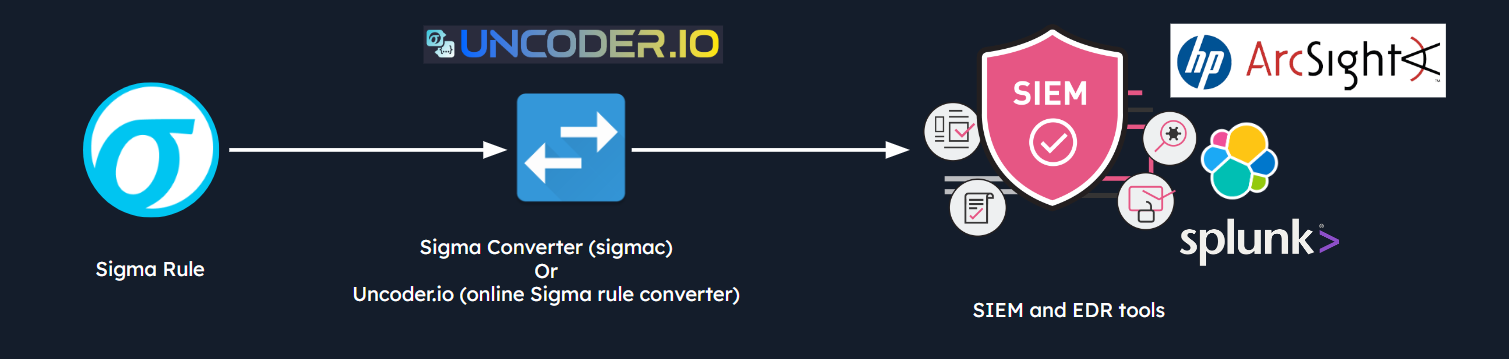 Source: Hack The Box - YARA & Sigma for SOC Analysts module
We can write detection rules once and then convert them to various SIEM and log analytics tool formats, sparing us the repetitive task of rewriting logic across different platforms. As an example, Uncoder.io facilitates the conversion of Sigma rules into tailor-made, performance-optimized queries ready for deployment in the chosen SIEM and XDR systems.
How does Sigma work?
At its heart, Sigma is about expressing patterns found in log events in a structured manner. So, instead of proprietary formats, with Sigma, we have a unified, open standard format for log-based threat detection.
Sigma rules are written in YAML. Each Sigma rule describes a particular pattern of log events which might correlate with malicious activity. The rule encompasses a title, description, log source, and the pattern itself.
The true power of Sigma lies in its convertibility. The original command-line compiler tool called sigmac (Sigma converter) was the legacy backend engine used to translate generic, vendor-agnostic Sigma rules (YAML) into specific queries or configurations compatible with a multitude of SIEMs, log management solutions, and other security analytics tools. With sigmac, we can take a rule written in the Sigma format and translate it into specific SIEM/EDR query languages (like Splunk SPL, Microsoft Sentinel KQL, or Elastic Lucene).
Note: pySigma is now the go-to option for rule translation, as sigmac has been completely deprecated.
Sigma rule structure
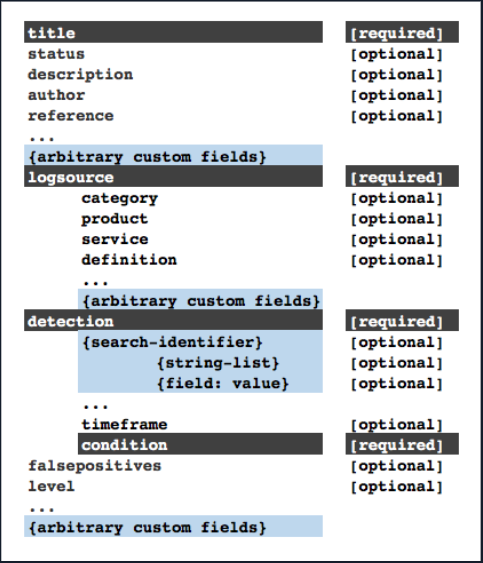
Sigma rule files are written in YAML format. Below is the structure of a Sigma rule.
Source: https://github.com/SigmaHQ/sigma-specification
To understand the structure of a Sigma rule, let’s consider the following example where the different components that form a Sigma Rule are shown:
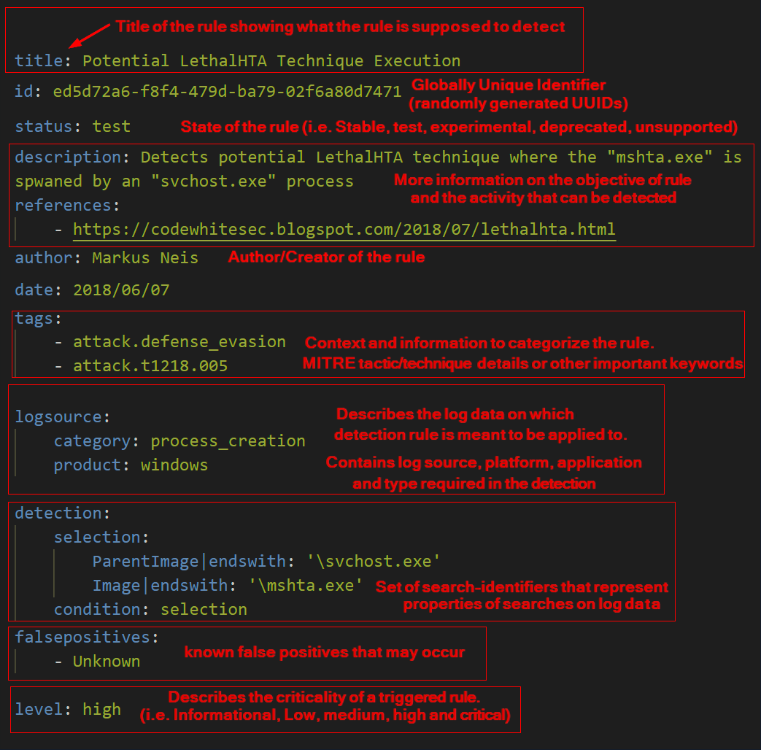 Source: Hack The Box - YARA & Sigma for SOC Analysts module
Based on Sigma’s specification, the following are the components of a Sigma rule:
title: A brief title for the rule that should contain what the rule is supposed to detect.
id: Sigma rules should be identified by a globally unique identifier in the id attribute.
status (optional): Declares the status of the rule (stable, test, experimental, deprecated, unsupported).
description (optional): A short description of the rule and the malicious activity that can be detected.
references (optional): Citations to the original source from which the rule was inspired. These might include blog posts, academic articles, presentations, or even tweets.
author (optional): Creator of the rule (can be a name, nickname, twitter handle, etc).
date (optional): Rule creation date. Use the format YYYY/MM/DD.
logsource: This section describes the log data on which the detection is meant to be applied to. It describes the log source, the platform, the application and the type that is required in the detection.
It consists of three attributes that are evaluated automatically by the converters and an arbitrary number of optional elements.
category: The category value is used to select all log files written by a certain group of products, like firewalls or web server logs. The automatic converter will use the keyword as a selector for multiple indices. Examples: firewall, web, antivirus, etc.product: The product value is used to select all log outputs of a certain product, e.g. all Windows event log types includingSecurity,System,Applicationand newer types likeAppLockerandWindows Defender. Examples: windows, apache, check point fw1, etc.service: The service value is used to select only a subset of a product’s logs, like thesshdon Linux or theSecurityevent log on Windows systems. Examples: sshd, applocker, etc.
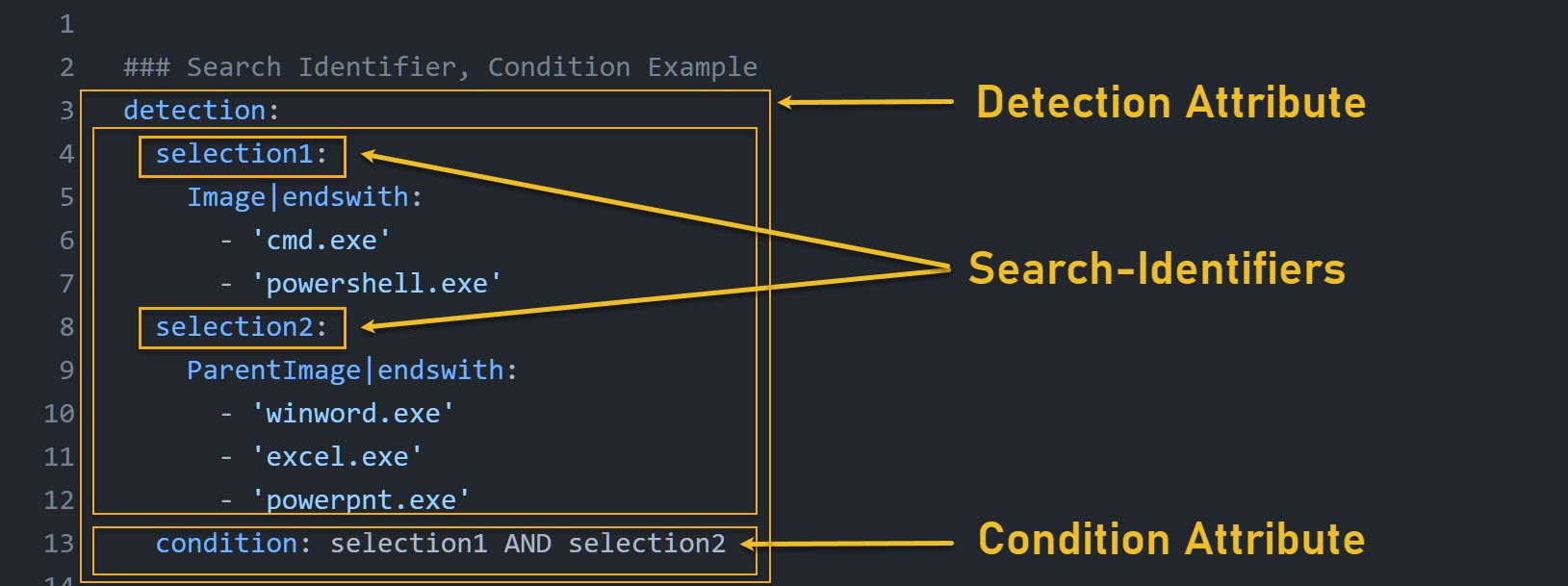
detection: A set of search-identifiers that represent properties of searches on log data. Detection is made up of two components:
- Search Identifiers
- Condition
 Source: blusapphire.io
The values contained in Sigma rules can be modified by value modifiers. Value modifiers are appended after the field name with a pipe character (|) as separator and can also be chained, e.g. fieldname|mod1|mod2: value. The value modifiers are applied in the given order to the value.
The behavior of search identifiers is changed by value modifiers as shown in the table below :
| Value Modifier | Explanation | Example |
|---|---|---|
| contains | Adds wildcard (*) characters around the value(s) | CommandLine|contains |
| all | Links all elements of a list with a logical “AND” (instead of the default “OR”) | CommandLine|contains|all |
| startswith | Adds a wildcard (*) character at the end of the field value | ParentImage|startswith |
| endswith | Adds a wildcard (*) character at the begining of the field value | Image|endswith |
| re: | This value is handled as regular expression by backends | CommandLine|re: ‘\String\s*$VerbosePreference |
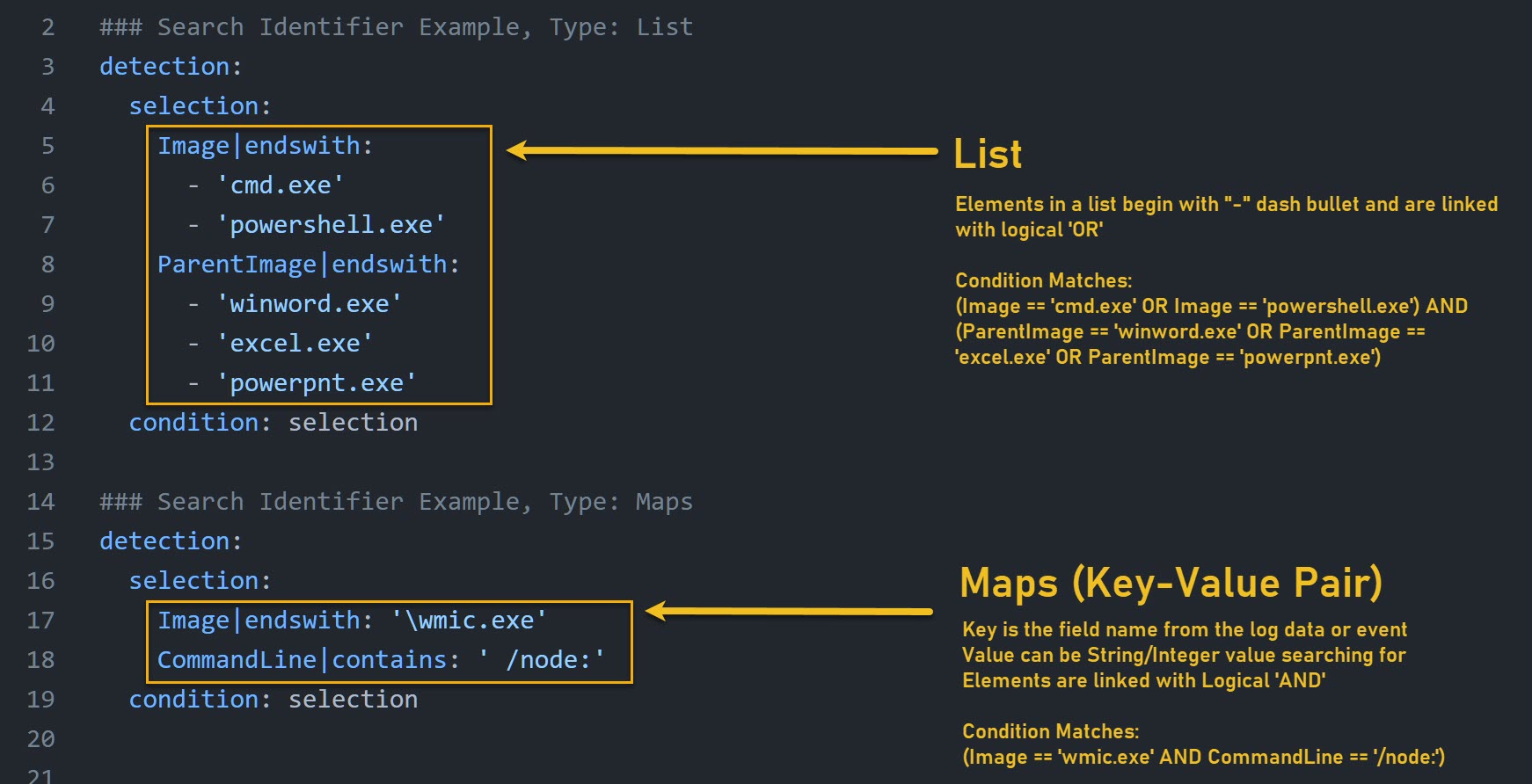
Search identifiers include multiple values in two different data structures: Lists and Maps.
 Source: blusapphire.io
Condition: Condition defines how fields are related to each other. If there’s anything to filter, it can be defined in the condition. It uses various operators to define relationships for multiple fields.
Sigma rule development best practices and common pitfalls can be found on Sigma’s Rule Creation Guide.
Developing a Sigma rule: LSASS Credential Dumping
To understand the process behind crafting a Sigma rule, let’s consider the “LSASS Credential Dumping” scenario where we have a sample named shell.exe (a renamed version of mimikatz).
After executing shell.exe, we collected the most critical events and saved them as lab_events.evtx (Windows Event Log file). The process created by shell.exe (mimikatz) will try to access the process memory of lsass.exe. The system monitoring tool Sysmon was running in the background and captured this activity in the event logs (Event ID 10).
Note
Event ID 10 corresponds to
ProcessAccess. The process accessed event reports when a process opens another process, an operation that’s often followed by information queries or reading and writing the address space of the target process. This enables detection of hacking tools that read the memory contents of processes like Local Security Authority (lsass.exe) in order to steal credentials for use in Pass-the-Hash attacks.
So, Sysmon Event ID 10 is triggered when a process accesses another process, and it logs the permission flags in the GrantedAccess field. This event log contains two important fields, TargetImage and GrantedAccess. In a typical LSASS memory dumping scenario, the malicious process needs specific permissions to access the memory space of the LSASS process. These permissions are often read/write access, among other things.
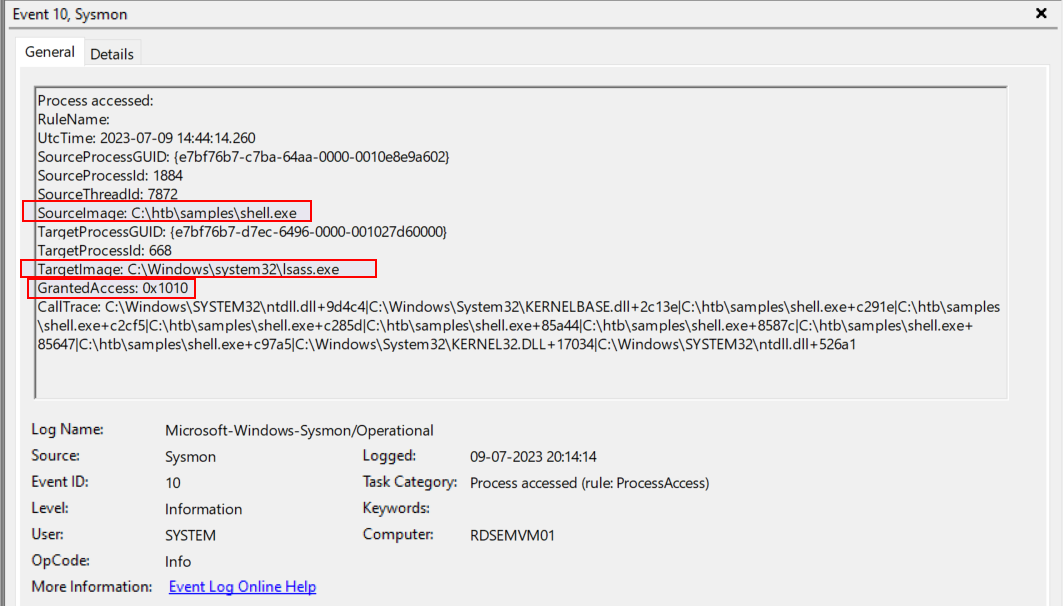 Source: Hack The Box - YARA & Sigma for SOC Analysts module
The 0x1010 hexadecimal flag essentially combines PROCESS_VM_READ (0x0010) and PROCESS_QUERY_INFORMATION (0x0400) permissions. To translate that: the process is asking for read access to the virtual memory of LSASS and the ability to query certain information from the process. While 0x0410 is the most common GrantedAccess flag used for reading LSASS memory, 0x1010 implies both reading and querying information from the process and is also frequently observed during credential dumping attacks.
To weaponize this information for detection, we would configure Sysmon to flag or alert on any Event ID 10 where the TargetImage is lsass.exe and GrantedAccess is set to 0x1010.
The following is a Sigma rule that checks for the abovementioned conditions:
title: LSASS Access with rare GrantedAccess flag
status: experimental
description: This rule will detect when a process tries to access LSASS memory with suspicious access flag 0x1010
tags:
    - attack.credential_access
    - attack.t1003.001
logsource:
    category: process_access
    product: windows
detection:
    selection:
        TargetImage|endswith: '\lsass.exe'
        GrantedAccess|endswith: '0x1010'
    condition: selection
MITRE ATT&CK Technique: https://attack.mitre.org/techniques/T1003/001/
The logsource specifies the log source that the rule is intended to analyze. It contains category as process_access which indicates that the rule focuses on log events related to process access (Sysmon Event ID 10). Also, product: windows specifies that the rule is specifically designed for Windows operating systems.
The detection section defines the conditions that must be met for the rule to trigger an alert. The condition part specifies that the selection criteria must be met for the rule to trigger an alert: in this case, both the TargetImage and GrantedAccess criteria must be met.
Scanning Windows Event Logs with Chainsaw
In cybersecurity, time is of the essence. Rapid analysis allows us to not just identify but also respond to threats before they escalate. When we’re up against the clock, racing to find a needle in a haystack of Windows Event Logs without access to a SIEM, Sigma rules combined with tools like Chainsaw are our best allies.
Chainsaw allows to use Sigma rules for large-scale analysis of event logs. Specifically, it allows us to use Sigma rules to scan not just one, but multiple EVTX files concurrently, offering a broader and more comprehensive scan in a very efficient manner.
Chainsaw is a freely available tool designed to swiftly pinpoint security threats within Windows Event Logs. This tool enables efficient keyword-based event log searches and is equipped with integrated support for Sigma detection rules as well as custom Chainsaw rules. Therefore, it serves as a valuable asset for validating our Sigma rules by applying them to actual event logs.
To conclude, Sigma rules revolutionize our approach to log analysis and threat detection. Sigma is like a universal translator that brings in a level of abstraction to event logs, taking away the painful element of SIEM-specific query languages.